Case Study · Kadeya
The Designer in the Machine
How the Proof of Concept Branch Is Making Product Designers True Contributors in the Software Development Life Cycle


There's a problem at the heart of software development. Everybody is talking about it, but everyone has different names for it. Some people describe it as a handoff problem between design and development teams. Others point to design drift or the apparent misalignment between design and dev. Those are all just symptoms of the central issue, though. The real problem is this: for most of software's history, designers and developers have been living on different planets and trying to create the same world.
Today, most designers live in Figma. Developers live in their IDE. The tools are different, the language is different, and the processes they follow are different. Every time the two worlds need to sync, someone has to make the trip. They land on an unfamiliar planet, navigate as best they can, and head back home before they've fully found their footing. Most of the time, that interplanetary courier is the Figma file and specifications the design team or project managers hand off to the devs.
The trouble is that a Figma file is not a real software product, it's a representation of a product, nothing more than a high-fidelity illusion of what the real thing should look like and built in a totally different medium than the real thing. This means every product needs to be built twice: once as a simulation and once in reality. Yes, this duplication comes with its own set of problems, but this is what the industry accepted as the cost of doing business.
At Brandcave, we've been doing product design for over ten years, and this problem has followed us through nearly every project. We've tried to solve it the conventional ways—tighter handoff documentation, more detailed design specs, closer collaboration with dev teams—and while those things help at the margins, they don't fix the fundamental issue. Once a design leaves a designer's hands, control goes with it. All the feedback and iteration that happens after handoff might as well be happening on a different planet. Until recently.
For the first time, AI is giving a product designer the ability to sit inside the actual codebase, build real screens with real interactions and raise a pull request just like any other contributor on the team. No more do we need to rely on a prototype or a Figma file exported for a developer to interpret. Designers can contribute working code, in the production repository, reviewed by engineers.
We know what you might be thinking. Designers writing production code sounds like a recipe for chaos, but we've tested this in the real world, and the results changed how we work. The future of product designers is not faster Figma files. It's designers who are true contributors within the software development life cycle (SDLC), operating at the strategic level and eliminating the costly handoff gap that has defined software development for decades.
Out With The Old
For most of Brandcave's history, a typical project followed a familiar arc. It started with discovery: interviews, research, entity relationship blueprints, information architecture, and flowcharting. Then, we created a Product Requirements Document (PRD) and dove into Figma designs. As stakeholders reacted to seeing their product take visual shape, we worked through revision cycles until everyone was aligned. From there, we handed off to the development team to start building and demoing, which surfaced its own round of refinements before the next sprint kicked off.
Every step in that process triggered a new round of rework. PRDs are great, but they're abstract. Designs bring the PRD into the visual world, which inevitably makes everyone feel differently about the requirements they previously agreed upon. UX designs, even with good prototyping, are not a real working application. Development brings a product to life and gives stakeholders and eventually users something to interact with, which makes everyone feel differently again.
By the time a product is shipped, it's been built twice over (at least) but no version is getting the best of both worlds. The prototype looks right but isn't real. The app is real but is a step removed from the design it was meant to reflect.
What is the biggest cost of the old way of doing things? At the end of the day, it's not that your design and dev teams are misaligned, or that the app that goes live lacks proper UI/UX in a few places, it's time. And time, in a market being reshaped by AI, has become the most competitive variable there is.
“In the age of AI, you have SaaS companies being spun up in a garage by one or two people, utilizing AI to move quicker than ever. So how does a software company respond? Do they keep doing this traditional process, which doesn't move quick enough anymore? Or do they consider a new avenue?”
Like so many workflows in the tech industry, AI has shaken things up. Of course, AI is able to help in the ways you expect, such as ideating through product ideas or helping you brainstorm UX patterns, but getting help with those tasks just speeds up a flawed process. The more meaningful shift happened in stages.
The first place AI naturally entered our workflow was through toy demos. These are interactive prototypes that could help think through the functional requirements of a feature before committing to a full design. Think of them as better wireframes. Toy demos are fast to build, easy to throw away, and far more useful for pressure-testing product thinking than anything static. For product managers and designers, this was a real upgrade. Instead of describing how something should work in a document, you could put something clickable in front of stakeholders in hours.
The second stage was bigger. We dropped Figma from the prototyping process entirely. If a Figma file is just an illusion of the real web app, the logical question becomes: why can't another web app just be the illusion? AI made it fast enough to prototype directly in code, and these new prototypes were fully interactive, responsive, and closer to the real thing than any Figma prototype could ever be. Still a simulation, but a much thinner one. The gap between the illusion and reality was shrinking.
The third stage is what this article is about. It's the bleeding edge, the part most teams haven't figured out yet. What if the designer wasn't building an illusion at all? What if they were building the real thing?
Kadeya forced us to answer that question.
The Project: Kadeya
Kadeya is a Chicago-based startup that installs what amounts to an automated bottling plant in a box the size of a vending machine. Their machines dispense filtered water and branded beverages into reusable stainless steel bottles. Instead of tossing the bottle, users return it to the kiosk, where it's washed, sanitized, and dried on-site. (Think bike sharing, but for bottles.) The result: 99% bottle return rates, zero plastic waste, and double-digit margin improvements for operators.
Their earliest customers are industrials, initially across the Midwest, and include Ecolab, Georgia-Pacific, Turner Construction, and Canteen — the foodservice division of Compass Group, the world's largest food and beverage service company. Kadeya also holds active U.S. Air Force SBIR contracts, which hints at the range of environments where keeping employees hydrated and happy is both a wellness priority and a productivity one.
But the vision extends well beyond that.
All told, this project required four separate applications: the HMI screen on the vending machine itself, a maintenance app for technicians, a mobile app to keep users engaged, and a full operations portal for managing organizations, sites, and inventory.
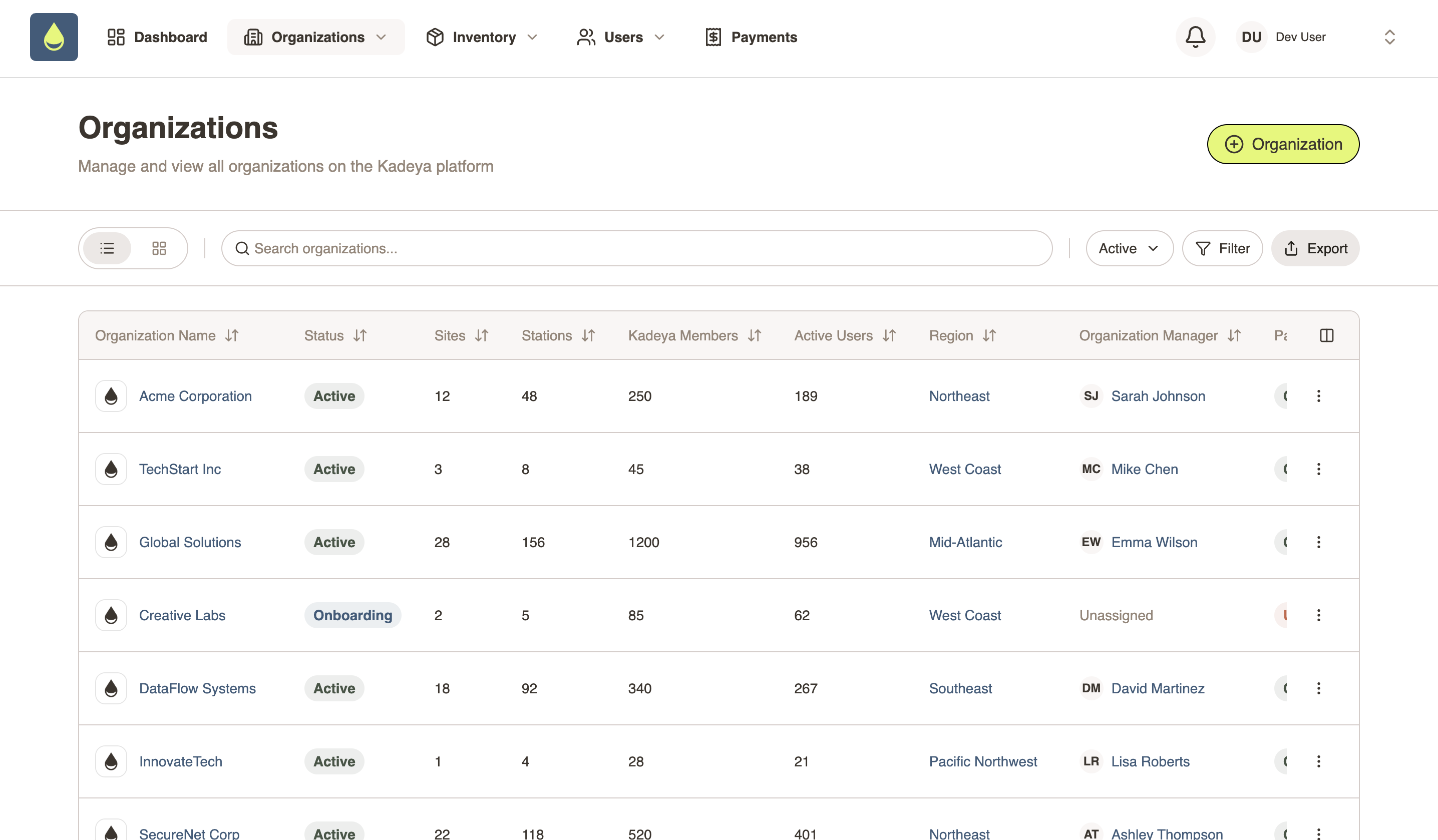
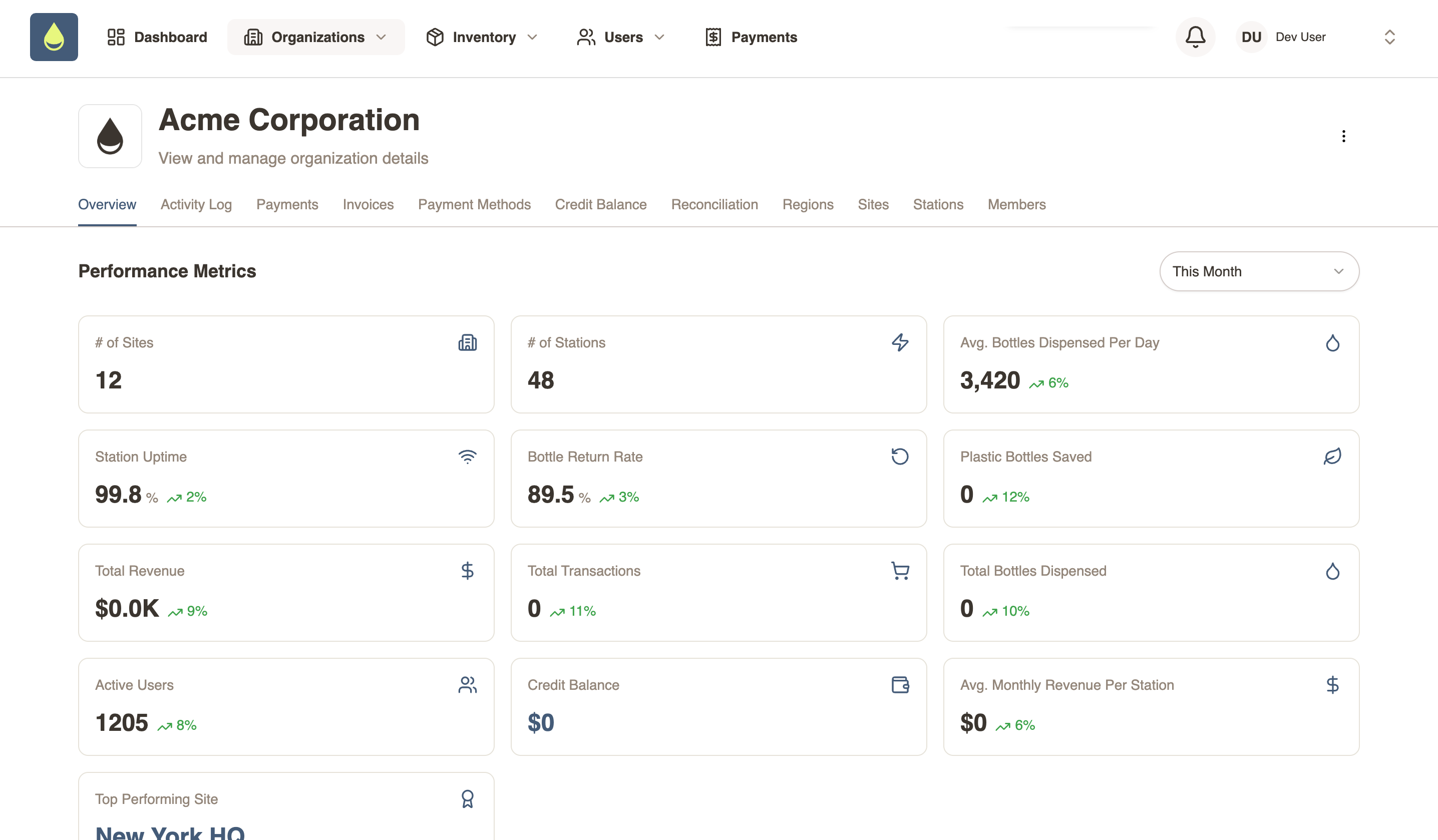
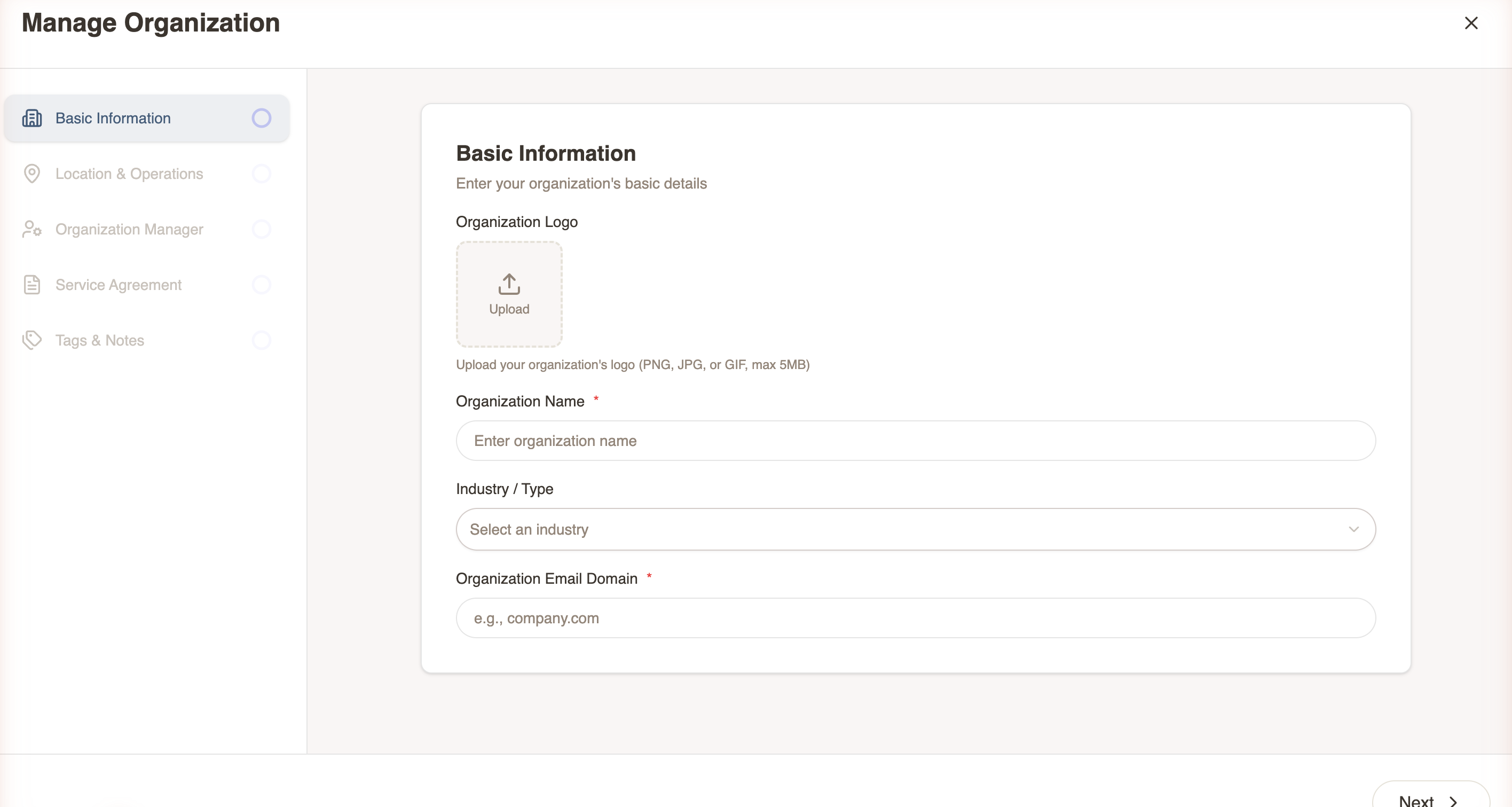
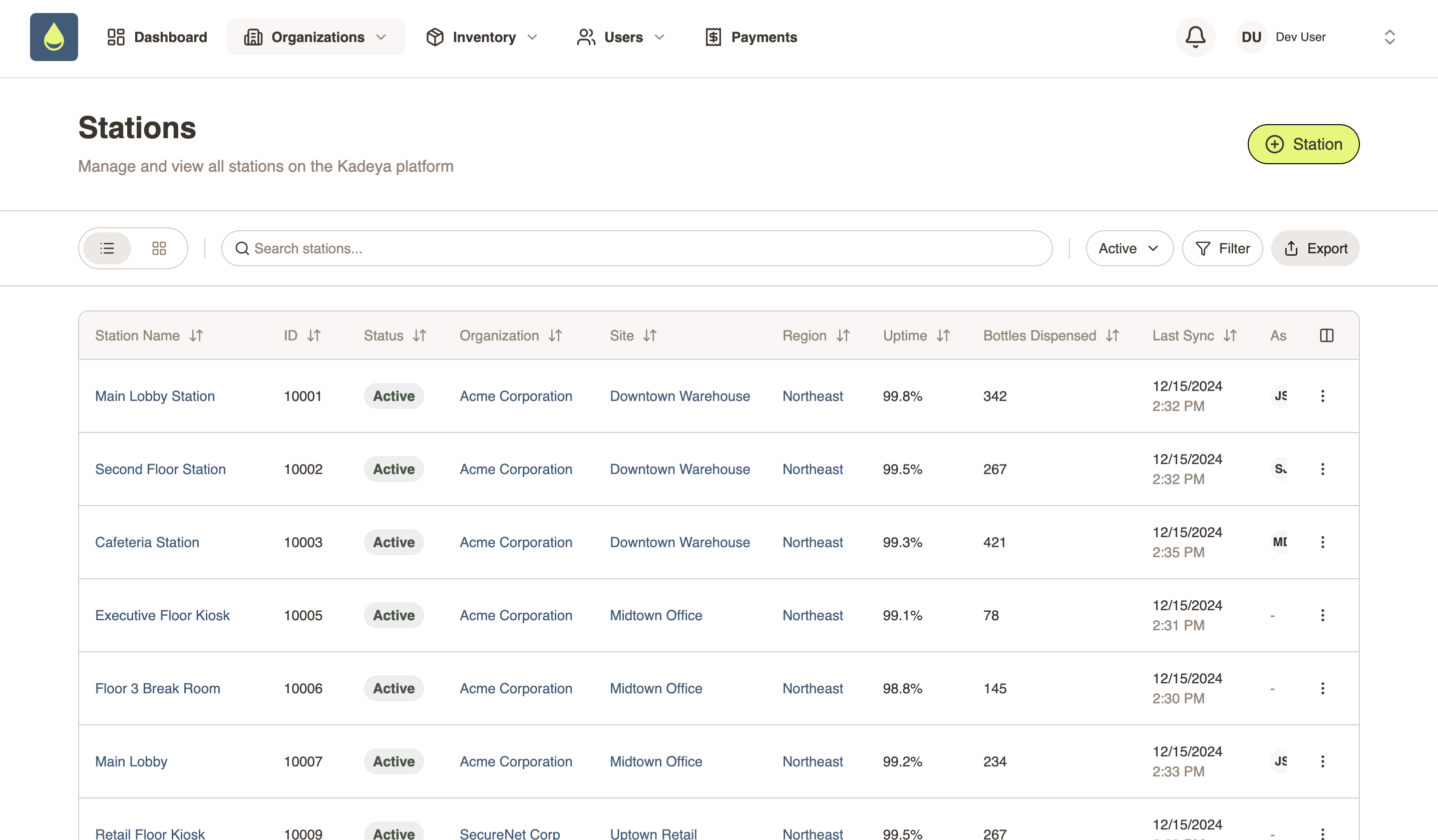
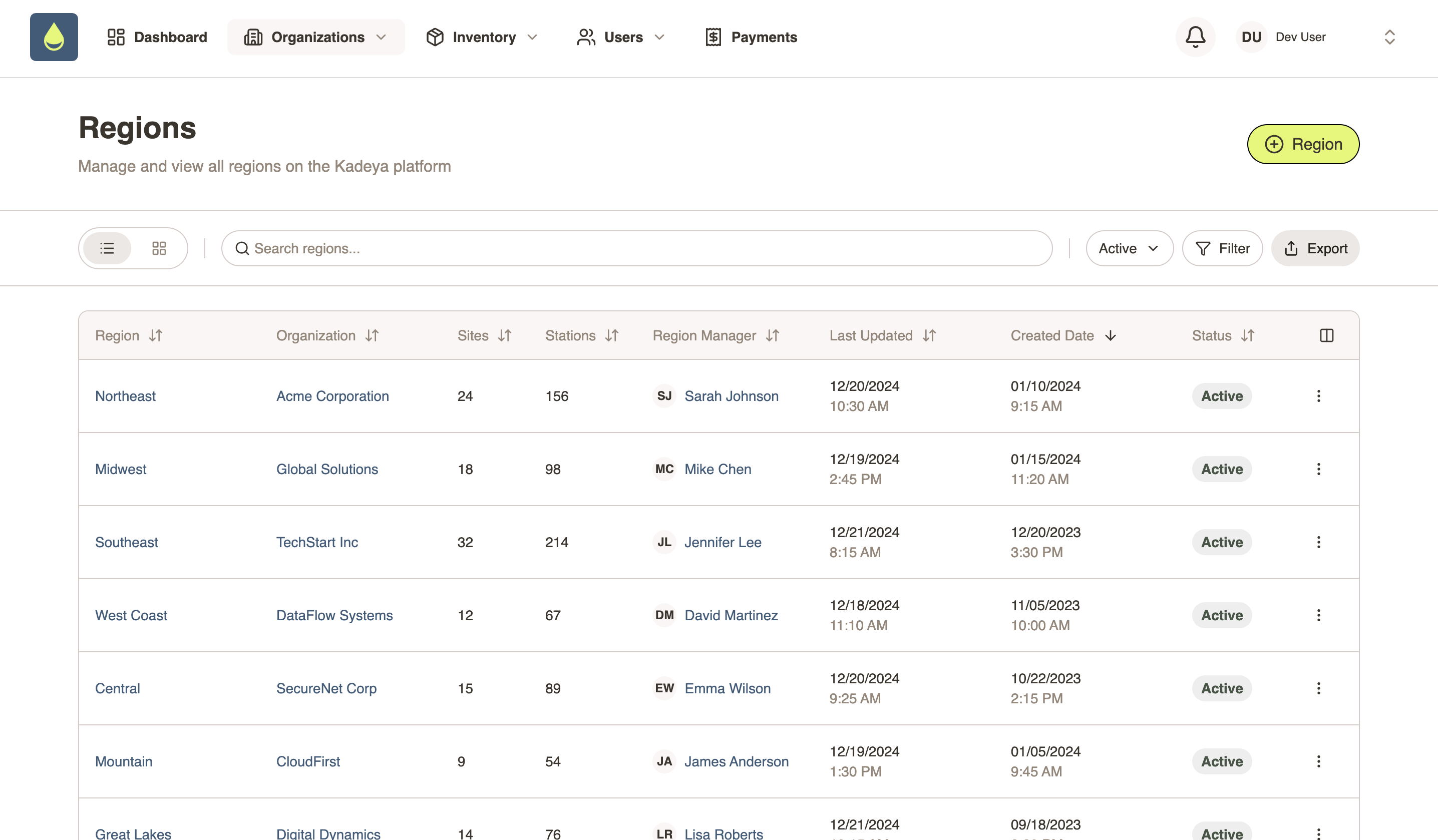
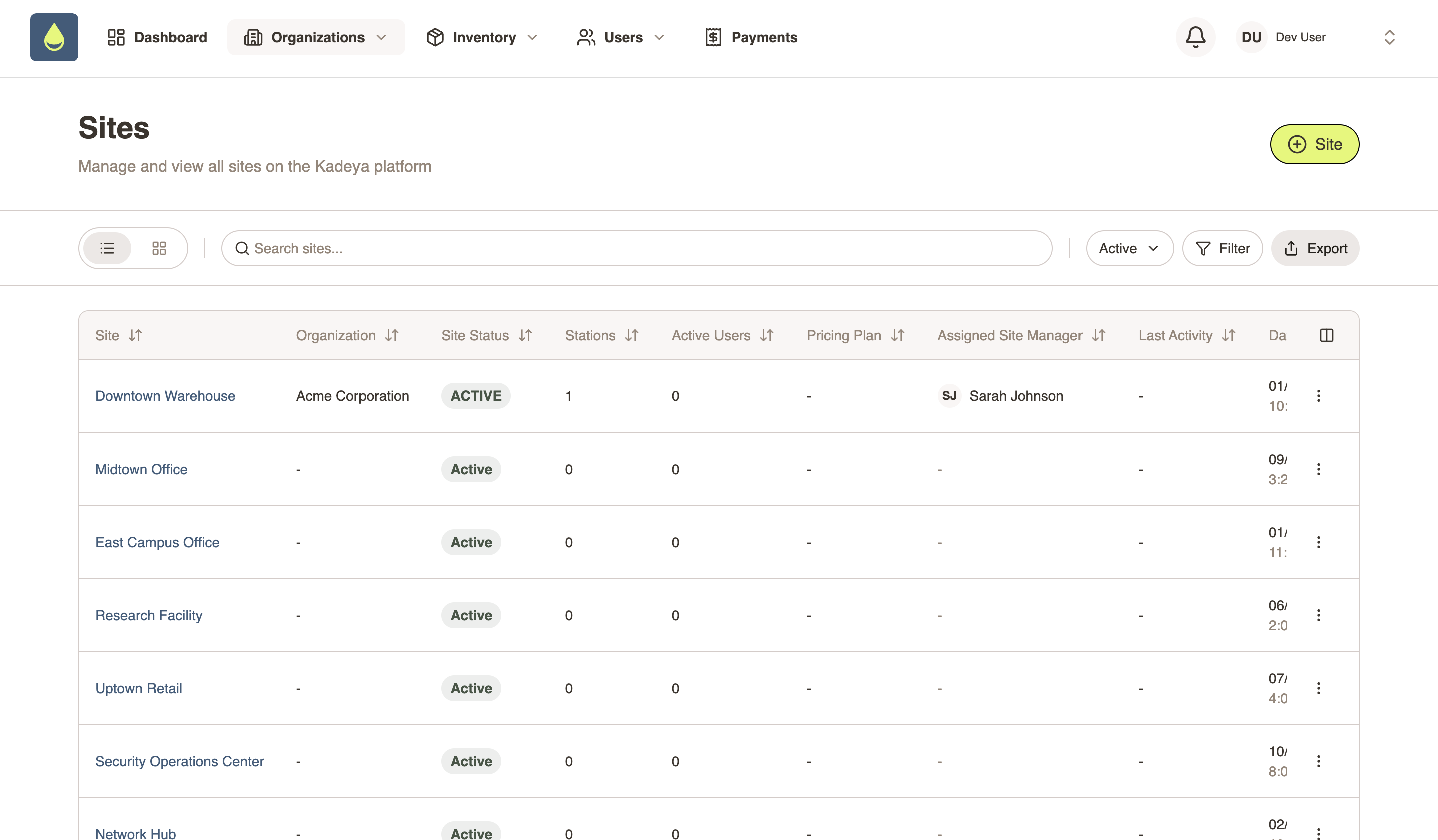
We started working on implementation in November 2025, but earlier in the year, we did the full discovery workup per our Blueprint Agile process, which includes entity relationship blueprints, information architecture, and flowcharting across every user type and workflow. It's a large, complex application and we didn't want to cut corners. We believe that regardless of the kind of design process you decide to move forward with, you'll always need discovery to provide you with a strong foundation.
The original plan was to follow that discovery with our standard Figma implementation process. The timeline had us delivering in June. Then Kadeya told us their first vending machine was shipping at the end of March.
Cody's first response wasn't to propose anything radical. He told them the typical response to these problems: cut scope or add resources. They did both, and it still wasn't enough to hit the March deadline. That's when a third option came up.
This third option was a fundamental rethink of how design fits into the development process. Interestingly, the idea didn't originate with Brandcave. As Denis Lussault, Kadeya's CPO and Head of Engineering, recalls, he mentioned "vibe coding" almost as a joke during one of their planning calls, and Cody surprised him by taking it seriously.
Before we go further, it's worth clarifying what we mean by vibe coding (and more importantly, what we don't mean). The term has come to describe anyone using AI to generate code, often loosely and without much process. What Brandcave was proposing for Kadeya was something more disciplined: spec-driven development. Every screen is built against a defined set of rules, reviewed against an SOP, and structured to meet the standards of a production codebase.
Before committing to the approach, Denis wanted to stress test the idea with someone he trusted. He brought it to Christophe Bellec, Kadeya's software architect. He expected pushback, but was surprised yet again when Chris was open to the idea.
“The only thing you need to make sure is that you have a process and some guardrails to make sure you don't do vibe coding like someone in your living room, but like professional software developers. Meaning a process, some validation, some testing.”

Coming from the person responsible for the integrity of Kadeya's codebase, that was the green light Denis needed.
The Solution: A New Branch in the SDLC
To understand what we changed, you need a quick overview of how a typical software development lifecycle is structured. Many projects run on three main branches: a development branch where active building happens, a staging branch for testing, and a main or production branch where you'll find the live product your users interact with. Code moves up through these branches in sequence, getting reviewed and refined at each stage before it ships.
For our two designers, Michelle and Kelsey, we added a new fourth branch, called the POC, or Proof of Concept, branch. This branch sits lateral to the development branch, not below it in the hierarchy, and runs parallel to it. Instead of building Figma mockups that the developers will later interpret and rebuild from scratch, the designers use the POC branch to design and build real screens in the actual repository that developers will eventually merge, refactor where necessary, integrate with the API, and ship.
The scope of what designers do in the POC branch is deliberately constrained, but it's worth being precise about what that means. Designers aren't building APIs or owning data modeling in the traditional sense. What they are doing is modeling out screens, defining functional requirements, and specifying the expected data each page needs through mock data, stores, and services.
This approach is sometimes called back-end for front-end. In this method, the designer defines the shape of the data the UI expects, and the engineering team uses that as a blueprint when they build the real API endpoints. So, it's not that designers have no influence over the backend. Their influence just flows through the UI layer and is driven by the needs of the product, which is where we want it to come from.
To make those screens functional without a live API, designers create types and seed data that simulate what a page will receive when it loads from a real endpoint. This is where we discovered a data adapter pattern would be very helpful. In this approach, a data adapter tells the services of the application whether to pull the mock data or a real API depending on the environment. On the POC branch, designers always work in mock mode. When the engineering team is ready to integrate, they flip an environment variable for the service and integrate the API into the contract.
Both live in the same codebase and never interfere with each other. It's a clean separation of concerns that keeps designers moving forward independently, regardless of where the rest of the project is in the development cycle. We'll get into how we arrived at this pattern later (spoiler: it was one of the most important things we learned from Kadeya).
This is also where AI earns its place in the process. Building in a real codebase introduces a different class of problems than designing in Figma. Patterns need to be consistent across screens being built simultaneously by multiple people, so AI became the connective tissue, helping to surface solutions and flag inconsistencies in real time.
Throughout each two-week sprint, each designer works on their own feature branches cut from the POC branch. As features are completed, pull requests are raised into the development environment for review.
The engineering team reviews it, merges it, refactors where necessary, and builds out the real API endpoints against the data shapes the designers established. Then it updates the POC branch and moves up the rest of the SDLC the same way all code does. In subsequent projects, we've formalized this handoff further with that data adapter pattern mentioned earlier.
The result is that designers are always running ahead. On Kadeya, Brandcave was ahead of original estimates based on our traditional Figma processes by at least two sprints at every point in the project. But more importantly, the relationship between design and development fundamentally changed. Designers were no longer throwing work over a wall and hoping fidelity survived the landing.
Think of it like the difference between composing sheet music and recording a track. For decades, product design worked like a composer handing off sheet music to a musician. The notes on the page were never the song itself, just an approximation of it, and every musician who interpreted them brought their own flair. The composer was always one step removed from the final sound. The POC branch is like giving the composer a recording studio. The score and the track become the same thing.
Why the POC Branch Works
The POC branch concept only works if the code that the designers produce is actually good enough to use in the actual product, and AI doesn't always produce great code. That's the obvious objection, and it's a fair one. Here's how we addressed it.
Initializing the Repo
The foundation starts before a designer writes a single line. Innostax, the engineering team developing Kadeya's four apps, initialized the repositories with the architectural patterns they wanted the codebase to follow. This matters more than it might seem.
“The thing about using AI to write code is that it does a decent job of extending existing patterns. So if there are good patterns set up in the first place, there will largely be good patterns that it outputs.”
In other words, good inputs produce good outputs. The repo itself should be able to act as a guardrail keeping this whole process on track. From there, designers work inside that structure using Anthropic's latest model and Claude Code to build screens. When given well-structured context and clear instructions, these models have the ability to write production-grade code that engineers can actually work with.
The Claude.md File
Every Claude Code session for the designers began with the agent reading a file called Claude.md. Cody built this document in collaboration with Chris from Kadeya at the start of the project, defining exactly how the AI should behave when building for Kadeya. You can think of it as a rulebook for the AI tool.
The Claude.md file outlined the ownership model: what Brandcave was responsible for, what engineering owned, and where the boundaries were. This meant that when our product designers were working, the agent wasn't trying to construct APIs or make backend decisions. It stayed in its lane because the rules told it to. Without issuing this set of rules at the beginning of a session, there would have been nothing stopping the AI from trying to write APIs that belonged to engineering, creating a mess that would have been expensive to untangle later.
AI-Assisted Ideation
Beyond just executing instructions, AI turned out to be a genuine design collaborator. As Kelsey describes it:
“As product designers, we're familiar with common UX patterns, but these models are trained on the entire web. Sometimes when you don't know the best pattern for something, it will essentially recommend one by just putting it on the page. And then you can decide, is this something we've used throughout the app, or do I need to create something new?”
Michelle echoes this, noting that the AI changed how she approached problems entirely:
“The agent was really able to help me try out ideas and create disposable proofs of concept that let me iterate faster toward the ideal solution.”
For designers who are used to Figma's relatively static environment, having a tool that could actively participate in solving a design challenge invites a whole new way of working. That kind of in-context ideation and pattern suggestion isn't something Figma was ever able to offer. The design tool and the design knowledge were always separate. Here, they become the same thing.
Figma's New Role
Even though most design work moved to the POC branch, Figma didn't disappear from the process. Rather than being the primary design deliverable, it became a source of truth for the design system and atomic theory, including the organisms of the application. The team designed out the major page patterns in Figma, such as list views, detail views, modals, forms, etc., establishing what the application should look and feel like at a high level.
Those patterns were then ported directly into the repository using the Figma MCP server, which allowed Claude Code to reference and recreate components based on what had been established visually. Crucially, the Claude.md file included a rule requiring the AI to follow atomic design theory when building components, the same structure used in Figma, so that what got built in the codebase stayed consistent with the design system from the start.
Figma went from being the end product of the design process to being the starting point for it. Good inputs produce good outputs.
The Human in the Loop
Perhaps the most important structural element of the whole process was a single person: the PM and lead engineer at Kadeya who sat between the POC branch and the development branch. Every pull request Brandcave raised went through him first. He'd pull down the code, make small refinements, update the Claude.md rules if a new pattern needed to be followed, and push it back up before it got merged.
“You had a QA in the middle, and that really helped bridge the gap between the code we were producing and what was ultimately used as production code.”
This role acted as a checkpoint and is what made the whole system work. Without it, the gap between POC output and production standards could have been a problem.
What Was Learned
Rarely does a brand new process survive its first test run with no alterations, and the POC branch was no exception. Kadeya helped us validate this approach, and it also showed us where the process needed to evolve.
Working Linearly vs. Re-engaging After APIs Are Live
The process works cleanly when it moves in one direction: designers build a screen, hand it off via PR, and the engineering team integrates it. The challenge on Kadeya was that we were working fairly waterfall. This meant that once the engineering team had built out the real API endpoints for a feature, the mock data was gone. If a designer needed to revisit that screen, there was nothing to work against. The separation between the design world and the live codebase that made the POC branch so useful became a complication. Iterating on something that no longer had mock data was harder than it needed to be, and it exposed a gap in the process we anticipated, but did not initially know how to solve.
The Data Adapter
On subsequent projects, Brandcave has introduced a new pattern we refer to as the data adapter. The adapter uses a simple environment variable that tells the application's services whether to pull from mock data or a real API when it loads, and routes accordingly. Both live in the same codebase. Designers always work in mock mode; developers flip the environment variable to build against the real API.
The tradeoff is that the two environments share a type contract. If the API team changes a type to support a real endpoint, it can break the mock data layer and the app won't compile. So, the rule is simple: if you break it, you fix it.
“With Kadeya, it would only use mock data or backend data. And that's what the issue was. With the new approach, it's completely separate. You can tell it to pull from mock data as opposed to API data. They never have to replace or switch. They're completely separate.”
The data adapter sits between the UI and whatever data source the application's services are using. It defines a simple contract: give me a collection, and I'll return data. Behind that contract, there are two implementations. A mock adapter pulls from local seed data, and an API adapter calls real endpoints. A single environment variable set to either 'mock' or 'api' determines which one the application uses. Flip the variable and the entire application switches data sources.
designers work here
engineers build here
With a data adapter, a designer could theoretically be building new screens in mock mode on a project that is years into production, without ever interfering with the live application. The two concerns are fully separated.
Some of you more technical folk may be thinking that this pattern reminds you of the Repository Pattern from Domain-Driven Design, and you wouldn't be wrong. Both exist to decouple business or UI logic from a specific data source. The difference is where they live. The Repository Pattern is a backend concern. It sits between application services and the database, using domain-specific methods shaped by business logic. The data adapter pattern is a frontend concern, built specifically to let designers and frontend developers build complete, realistic UI flows before any backend exists.
This is different from simply having mock data sitting in a file somewhere. The adapter enforces a strict layer structure; pages talk to services, services talk to the adapter, and the adapter talks to the data source. Neither side can reach past its own boundary. That discipline is what makes the handoff clean and what makes the POC branch sustainable over the long term of a project.
For designers, this means the codebase is always available to work in, regardless of where engineering is in the process. For engineers, it means they can build and integrate API endpoints without ever touching the UI layer. The two concerns are genuinely separate, both in theory and in practice.
The Ownership Contract
The data adapter solves the technical separation problem, but technology alone isn't enough. The adapter only works if both sides hold up their end of the bargain. When the engineering team decides to make different architectural decisions or change the shape of the API such as adding a field or changing a data structure, they're responsible for updating the types and the mock data then updating the POC branch. When designers change the mock data, the engineering team updates the API accordingly. The rule is simple: POC and Dev stay in alignment. Neither side gets to make changes in isolation without accounting for the other.
How Kadeya Liked This New Approach
As CPO and Head of Engineering for Kadeya, Denis is not someone who takes technical risk lightly. With 25 years of experience in the industry, he knew exactly what he was agreeing to when he said yes to this process and yes, he did have a few concerns.
“I was more worried about the quality of the software. I know the amount of validation and human in the loop you need to put in to make sure your code is actually good.”

What gave him confidence wasn't empty reassurances, it was the initial trial the team did where they coded out a few pages before committing this approach for the full project. Innostax reviewed the output, flagged what wasn't working, and the process was refined accordingly.
As Denis describes it, Cody "was not like, let's do vibe coding and see you in February. He was like, okay, let's do this on a couple of pages." After seeing the results of that trial and understanding the guardrails that were in place, Denis was in.
The team moved so fast that Kadeya's requirements were still evolving underneath them. As Denis notes, the lesson for next time isn't about documenting more upfront, it's about accepting that requirements will change, and building a process that accounts for it. When a team is moving at this speed, the client needs to be just as ready to iterate as the designers are.
Ultimately, taking a risk with this approach allowed them to get everything needed in the timeframe they had. When asked what the traditional route would have delivered by March, Denis doesn't hesitate. "The scope would have been like half of it. Probably 40% of the features would not have been there."
His advice for anyone considering this approach? "Go with people who know what they are doing." He's quick to add that the process isn't right for every part of a product. On Kadeya, certain components, particularly anything touching hardware safety or machine operation, were built the traditional way.
“Don't risk the core of your business yet. Front end pages, website type of interface, portal, database—all that stuff works well.”
Knowing where to apply the process, and where not to, is itself a form of expertise.
The Future of Product Design
Brandcave completed its work on Kadeya in the first week of March, several months ahead of the original timeline, and at least two sprints ahead of internal estimates at every point in the project. The more important milestone wasn't the deadline, though, but the proof of concept this project represents.
This method isn't theoretical anymore. Since Kadeya, Brandcave has replicated the POC branch approach across multiple projects, refining the process each time. The data adapter, the ownership contract, and the Claude.md rulebook are no longer experiments but components of a repeatable system.
For anyone skeptical about whether this represents a real shift or just another tool trend, it's worth remembering that design tools have always evolved. Adobe XD, Sketch, InVision, Figma—each one replaced something that felt like a technological breakthrough at the time.
“That's just a trend in technology. You always have to be ready to pivot or you get left behind.”
Vibe coding is just the next step in a journey that is always moving in this direction.
But this isn't a story about tools, it's a story about what designers can now do with them. That's because the POC branch process still demands real design fundamentals, like knowing what to call things, recognizing when a pattern is wrong, or being able to direct the agent with enough precision to get something useful back.
“When I'm communicating with the agent, I'm using terms I usually use when designing—adjust the padding, the primary action should do this. This component should be structured like this. I still feel like a designer. I really don't think you can be that successful in vibe coding if you don't have any prior knowledge of how things are built traditionally. The way I build when I vibe code is very similar to how I built in Figma, except I'm telling it with words instead of physically doing it myself.”
This process doesn't allow just anyone to hop into the designer seat. What it does do is elevate good designers by allowing them to shift where their energy is being spent. Instead of getting pulled between strategic thinking and pixel-level execution, designers can stay at the level where they do their best work.
“If AI does something I don't like and I myself am unsure how to solve a problem, I'll just ask: can you give me three other options? AI doesn't make me right more often. It just helps me fail faster. AI removes the friction of trying out ideas and getting to the right solution faster.”
That's the shift this process makes possible. Not replacing the designer's judgment, but finally giving it room to operate.
The gap between design and development was never a technical problem. It was a workflow problem. The POC branch is the solution and as Cody says:
“This was an experimental project that validated something we believed: product designers belong inside the SDLC as true contributors. Following the right processes, the right procedures, with the right talent, you can utilize AI to not just elevate the value of product designers, but also increase the velocity of projects.”

